
It took a while, but I’ve finally started to get the question from readers: “Are you the same Randy Cassingham that wrote the book on the Dvorak keyboard?”
Yes — surely one Randy Cassingham in the world is enough.
For those who don’t know, the Dvorak is an ergonomic alternative to the standard “Qwerty” layout found on most computers and typewriters, and its popularity is increasing more than ever.
The Dvorak layout was inspired by an early disciple of ergonomics pioneer Frank Bunker Gilbreth. Dr. August Dvorak, who was a professor at the University of Washington, gathered a small research staff, and it took them 12 years to perfect the design — there were no computers to help in the 1920s.
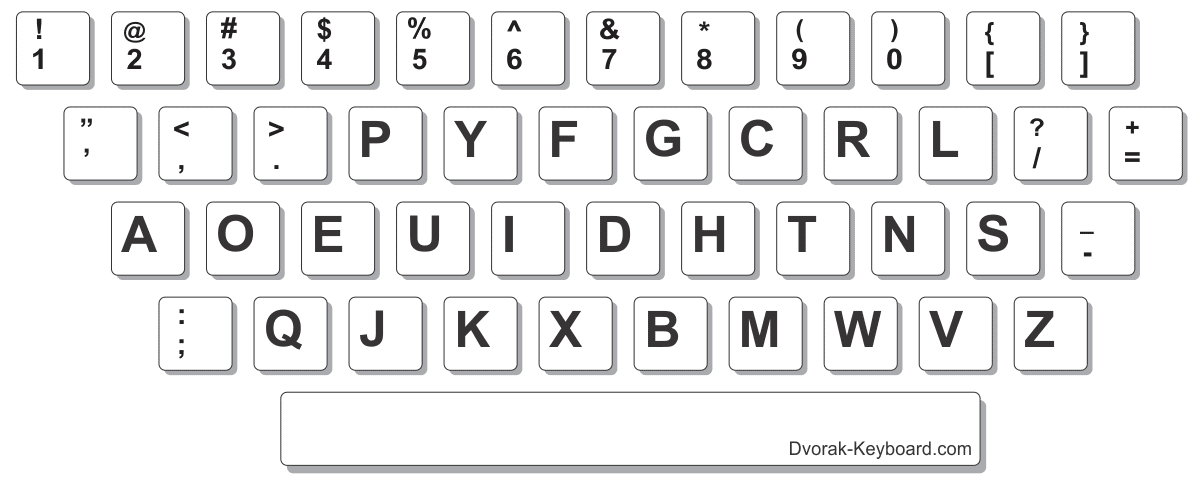 The Dvorak layout is, by design, much easier to type on and much easier to learn than Qwerty. Many of the mainstream typing tutor programs (Typing Tutor VI, Mavis Beacon) will teach you how to use it.
It’s Perfect for Writers
Personally, I learned Qwerty in high school, but I doubled my speed to over 100 wpm by switching — quite handy for a busy writer.
And while there have been no studies on it yet, I suspect the Dvorak layout would help reduce repetitive strain/carpal tunnel injuries which are becoming so common.
Dr. Dvorak and his team documented their results in a fascinating book called Typewriting Behavior, which was published in 1936. A 536-page book (!) on a typewriter keyboard design? Yes: in the 30s, there were books and magazines about typewriting just as there are books and magazines about computers today — the typewriter’s impact on business produced similar radical changes.
No, my book is no longer available: it’s sold out. The interesting thing: Dr. Dvorak’s book is available — I’m its exclusive distributor. These are hardcover volumes printed in 1936, so when they’re gone, they’re gone forever.
My 1986 book The Dvorak Keyboard provided a nice overview of the Dvorak layout, what’s “wrong” with Qwerty, what’s “right” about the Dvorak, and some history of the Dvorak’s evolution since 1936. It also has hard-to-find information on Dr. Dvorak’s special keyboards for one-handed people, which he designed for a friend injured in World War II.
– – –
My web site’s page on the Dvorak was getting so much traffic that it has been spun off to its own site, the Dvorak Keyboard — and my shopping cart has a Dvorak keyboard section with various information products, including that 1936 book.
The only trouble with remapping your own keyboard is that you must manually move the actual keys. It’s not that hard to do as most keys just pop off and are easily placed in their new locations.
The main problem is for touch typists, you lose the little bumps on the keys under where your index fingers should be placed. On a QWERTY keyboard, it’s the “F” and the “J” keys.
—
Many keyboards have “sculpted” keys — different shapes depending on what row they’re on, so they’re not amenable to being moved around. At home, I have a keyboard that shows both legends, and you can get labels to stick on the keys (I saw them advertised on this very entry, in fact!) On my laptop, I don’t bother anymore — I touch type, and rarely look at the keys for any reason. -rc
I am very interested in the Dvorak layout, but I am curious about two things: 1) did you teach yourself or did you have some practice guides to help you gain familiarity with the layout? 2) How do you handle it if someone who doesn’t know the Dvorak layout needs to work on your computer (for repairs or something), do you switch it back to the Qwerty layout?
—
1) Yes, but it’s a dumb way to do it since it’s slow and frustrating. I was stuck doing it that way since there were no good Dvorak typing tutorials when I switched (while in college). These days there’s a great tutorial which, very importantly, was developed specifically for the Dvorak layout: see Keytime.com. It’s what I would use if I were starting from scratch.
2) It is VERY rare I let anyone touch my computer. Even my wife knows better. But If I really have to, switching it back to Qwerty is a cinch. My Dvorak keyboard site has info on switching computers. -rc
I have been interested in the Dvorak layout for awhile now. The only thing holding me back is that I don’t have a computer terminal at work that only I use, so I’d have to keep switching back and forth from QWERTY to Dvorak all the time.
*sigh*
—
It’s not that bad, really: it’s kind of like being able to switch between the touch-tone pad on your phone and a calculator (they’re VERY different!) So it can be done if you want, but there is a PITA factor…. -rc
I am a devotee of the right-hand Dvorak and I recommend it for anyone who has only one hand. I am 62 years old and I was born without a left hand. In high school, I had an opportunity to learn the touch system on a one-handed typewriter. For decades, a few typewriters then computer keyboards were built with Dvorak layouts (expensive), then there were pre-wired keyboards, until a major step forward starting with Windows 3.11 when you could simply select the layout to apply to any keyboard. An important “key” (pun intended): glue rounds of felt or other material to the home keys. The Dvorak has helped me succeed in a two-handed world!
—
Neat! And yeah, it’s nice to be able to switch pretty much any computer with built-in software, rather than have to buy a keyboard. Glad it has helped you. -rc